A retirement planner for UK households
Will your money last?
Landfall shows the year you could stop work, and the year your money runs short if it ever does. It also compares the tax on different ways of taking your pensions and savings.

- The projection is free
- No account to make
- Your figures stay on your device
iPhone, iPad, Mac and Windows 11. The same engine on every one.


Try it
Move Elton’s year and watch the answer change
A sample household from the app, projected by the same engine. Choose when Elton stops work and what he spends in the years after, and read what the plan says.
- Working
- Retired
- Runs short
With Landfall +
The stress test
Is this enough?
The three Retirement Living Standards for one person
Elton is one of eight sample households in the app, each one yours to change. The first answer is free.
Forty-five seconds
Watch what the apps do
The free projection first, then what Landfall + adds, in the apps’ own screens.

The first answer is free
Open a sample household on your own device and read its verdict.
The verdict
Every plan opens with its answer
Fully funded, or the year it runs short. The sentence comes first, then the timeline that puts dates on it, then the figures that add it up. Everything below is that sentence in more detail.

Gold is the day you stop
One marker per person, on the year after their last earnings. The same mark stands on every chart.
Teal is the State Pension
A hollow ring where each person’s State Pension starts, so guaranteed income reads apart from retirement.
Red is where it runs short
Years that are not fully funded sit under a red band, named with the first year it happens.
The working
Then it shows you why
Two charts carry most of the story: where each year’s money came from, and what the charges on it quietly took.

Where the money comes from, year by year
Earnings first, then pots, then the State Pension, stacked against the spending you asked for.

What charges cost over a lifetime
Modest-sounding fees compound too. What was handed over, and the growth that money never earned, year by year.
The charts
Every question the plan can draw
Five more from the same plan. Each chart names its years, its people and its marks on the drawing itself.

Assets over time
The pots the plan can draw on, stacked by year, rising to retirement and drawn down after it.

Income and the tax on it
Gross and net household income, with each person’s tax beneath, falling at retirement and rising when the State Pension starts.

Withdrawal approaches
The same plan drawn three ways of taking the pension, and what each way leaves at the end and pays in tax.

The stress test
A Monte Carlo simulation: what your pots could be worth across hundreds of market futures, banded by how many scenarios fall inside.

Compounding
Two savers, one who starts early and stops, one who starts later and keeps going. The Learn page lets you move every figure.
Why Landfall
Built to be checked, not believed
Six things the apps hold to, and are tested against.
01
Every figure names its source
Each tax rate, threshold and allowance is a dated record naming the page or the Act it came from. Your plan shows that trail beneath its verdict.
02
Your plans stay on your device
Nothing is sent to a server, and there is no account to make. iCloud Drive, or OneDrive on Windows, is the only network Landfall uses, and only when you switch it on.
03
One engine on every device
The iPhone, the iPad, the Mac and Windows run the same projection, so a plan gives the same figures wherever you open it.
04
The projection is free, all of it
Every rule, every tax year, the same either way. Landfall + is for what comes after the first answer.
05
It informs. The decision stays yours
Landfall informs. It shows you what your own figures imply and leaves the decision with you. For a decision about your own money, speak to a regulated financial adviser.
06
It says where it stops
Where something is left out and it moves a figure you are reading, the app says so beside that figure.
The first five minutes
What happens after you download
No account and no sign-in. The app opens with a welcome, the sample households are a tap away, and your own plan takes a few remembered figures.
01
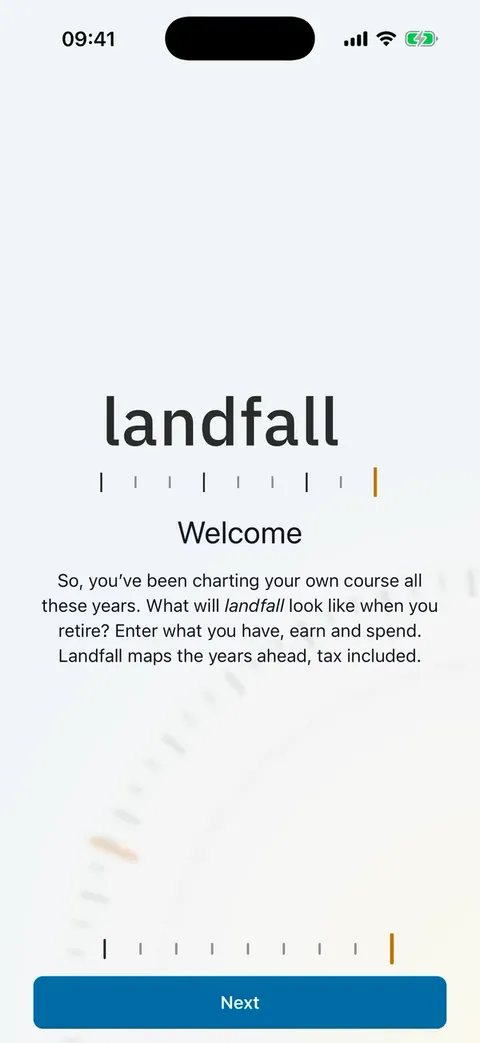
A welcome, then the samples
Eight households are built in. Open one and read its verdict before entering a figure of your own.
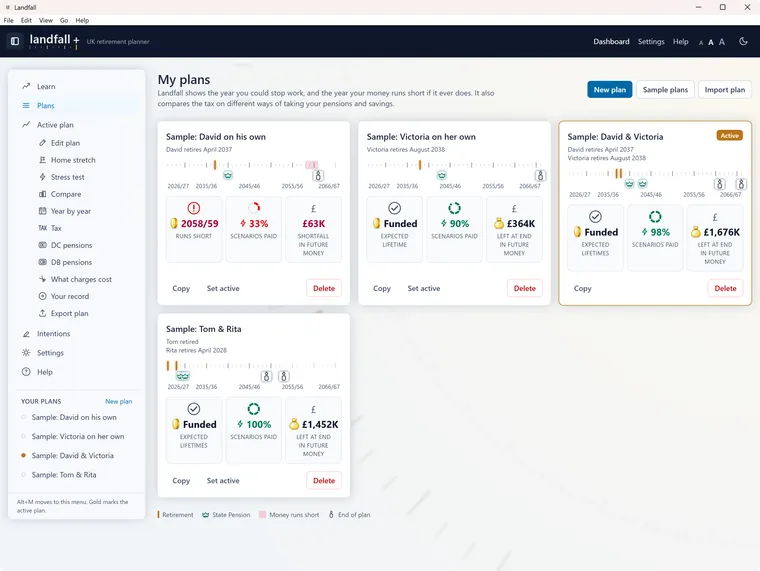
02
Enter what you remember
A date of birth, what you earn, the rough size of your pots and what you spend. A rough plan is a first answer, and every figure can be corrected later.
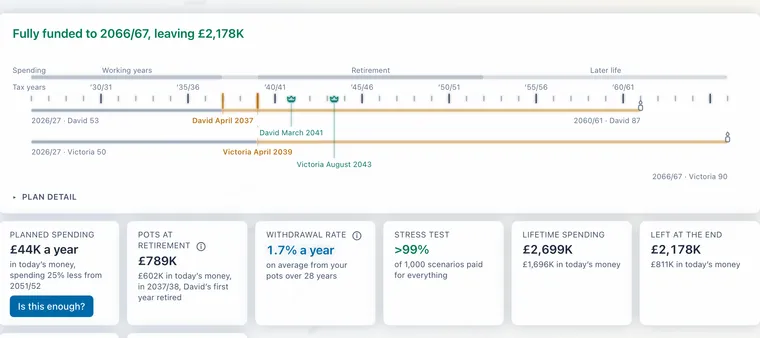
03
Read your own year
The plan opens with its sentence, then the timeline, then the charts and the tax. Change anything and the answer moves with it.


Free, and Landfall +
The first answer is free. The second is where + begins
One plan, the whole engine, at no cost. A yearly subscription opens more plans and the tools for testing them.
Free
Landfall
The whole projection, one plan, on this device.
- Every projection, every rule, every tax year
- The timeline, the charts, the year by year and the tax
- Export as a file, a table or a PDF report
- Sample households to explore before you have figures of your own
A yearly subscription
Landfall +
For what comes after the first answer. One purchase for iPhone, iPad and Mac, and one for Windows.
- Unlimited plans, compared side by side
- Sync through your personal online cloud storage, so the same plans are on every device
- Stress testing against up to 2,000 possible market paths
- A lock that asks for Face ID, Touch ID or your password
- A crash scenario: one bad run of markets, at a moment you choose
- Your own Intentions record, kept version by version
- The Home stretch: a different leaving month or a move of spare savings, tried and then written into your plan
- ‘Is this enough?’ Your planned spending set beside the Retirement Living Standards
- Later-life care in the plan: a care home or nursing home, its fees, and what the council pays
Stop paying and nothing is taken away. Every plan still opens, projects and exports. The price is shown in the app, in your own currency.
The apps
On your iPhone, iPad, Mac and Windows PC
Three apps, one engine. A plan moves between them as a file, or with Landfall + through iCloud Drive on Apple devices and OneDrive on Windows.
iPhone and iPad
One app for both, coming to the App Store. On the iPhone each plan is a card with its own timeline. On a wide iPad, My plans is a table with every plan drawn on shared years.
Mac
The same plan, the same engine and the same words, in a window. It is coming to the Mac App Store.
Windows
The same plan, the same engine and the same words, in a window on Windows 11. It is on the Microsoft Store.
One purchase per store
Billed by Apple once, for every device on your Apple Account, or by Microsoft for Windows. Cancel any time.
Questions
What people ask first
Short answers here. The help goes further on each.
Is Landfall financial advice?
No. Landfall shows you what your figures imply. It does not give financial advice or tell you what to do with them. MoneyHelper, which is government-backed and free, covers pensions, savings and debt. Pension Wise, part of the same service, offers a free appointment about defined contribution pension options. For a recommendation about your own circumstances you need a regulated financial adviser.
Who is Landfall for?
Landfall suits a UK household of one or two adults with pensions, savings or investments and a rough idea of what they want to spend. Most people who find it useful are somewhere between building a plan and checking one they already have.
What does Landfall cost?
Making a plan and reading its projection cost nothing, and the projection is the whole engine on both tiers. Landfall + is a yearly subscription for more plans and the tools for testing them. The price is shown in the app, in your own currency, before you subscribe.
Where do my plans live?
On the device you made them on. Nothing is sent to a server, and there is no account to make. With Landfall +, your plans follow you through your own iCloud Drive, or OneDrive on Windows, and only when you switch it on.
Does it cover Scotland, Wales and Northern Ireland?
Yes. Each person in a plan lives in one of the four nations: England, Northern Ireland, Scotland or Wales. Edit plan sets it for each of you, under “Lives in”, and it holds for the whole plan. Which figures the nation changes, in more detail. Income tax on earnings and pensions uses that nation’s own bands, and care follows that nation’s own financial assessment.
Can we plan as a couple?
Yes. It is built for one household of one or two adults planning for themselves. There is no third person and no adviser view. Each of you has your own earnings, pots, State Pension and year of stopping work.
Where do the tax figures come from?
Each tax rate, threshold and allowance is a dated record naming the page or the Act it came from. Your plan shows that trail beneath its verdict. Where a figure is an estimate rather than a rule — typical fund charges, or what a care home costs — it is labelled an estimate and carries the date its sources were read. Anything we cannot source properly is recorded as a gap rather than filled in from memory.
How accurate is it?
Growth is applied exactly as the plan sets it, every year, with no good years and no bad ones. That is deliberate. It is what makes two plans comparable, because the only thing that differs between them is the thing you changed. Markets do not behave that way, which is what the stress test is for.
What happens if I stop paying for Landfall +?
Stop paying and nothing is taken away. Every plan still opens, projects and exports, and a lock you turned on stays on. On the free tier the active plan is the one you can edit.
Who makes Landfall?
RMPF Consulting Ltd, a company registered in Northern Ireland. Landfall began as one household’s own retirement plan. The tools we tried either hid their working or kept the plan on somebody else’s server. Questions, defects and ideas all go to support@landfall.money.
Help, in the open
See how it was made
Every help page the apps carry is here too, word for word, before you install anything.
Getting started
What Landfall is for, and how to get a first answer out of it.
The app itself
Your data, the subscription, and where to go when a question is about you.
How the numbers work
The model behind the figures, and where each figure comes from.
The choices you make
The settings that change what a plan does, rather than what it starts from.
Testing a plan, and keeping it current
What happens after the first answer.
See your own year
Will your money last?
Enter what you have, earn and spend. The first answer is free.
Coming to the App Store for iPhone, iPad and Mac.
- The projection is free
- No account to make
- Your figures stay on your device